


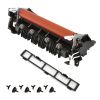

Fuser for Brother MFCL9570CDW
Limited Stock
Category
Code
Fuser for Brother MFCL9570CDW
Description
Maintain the professional-grade output of your Brother enterprise color laser printer with the Genuine Brother LR2241001 Fuser Unit. Specifically engineered for the high-demand MFC-L9570CDW, this fuser unit is the critical component that uses heat and pressure to permanently bond toner to the paper, ensuring smudge-free, sharp, and vibrant prints every time.
Key Features
-
Precision Bonding: Designed to reach the exact temperature required for Brother genuine toner, ensuring consistent text clarity and rich color saturation.
-
High-Yield Reliability: Built to handle the heavy workloads of a busy office, this unit offers a long duty cycle, minimizing downtime and maintenance frequency.
-
Seamless Compatibility: As a genuine OEM (Original Equipment Manufacturer) part, it is guaranteed to fit perfectly and communicate accurately with your printer’s internal sensors.
-
Error-Free Performance: Replacing an aging fuser unit resolves common printing issues such as toner smearing, vertical lines, paper jams at the exit, and "Replace Fuser" error messages.
-
Easy Installation: Designed for user-friendly replacement, allowing you to get your printer back in service quickly without requiring specialized tools.
Technical Specifications
| Feature | Specification |
| Part Number | LR2241001 (D016R1001) |
| Compatibility | Brother MFC-L9570CDW, HL-L9310CDW |
| Estimated Life | Up to 150,000 Pages (based on 3 pages per job) |
| Voltage | 110V - 120V |
| Type | Genuine Brother Replacement Part |
| Function | Toner Heat Fusion and Paper Exit |
Why Choose Genuine Brother Parts?
Using third-party fuser units can lead to inconsistent heating, which often results in premature component wear or poor toner adhesion. The Brother LR2241001 is rigorously tested to ensure it meets strict environmental and safety standards, protecting your printer investment and ensuring your documents always look their best.
Note: It is recommended to perform a "Fuser Life Reset" via the printer's maintenance menu after installation to clear the replacement prompt and accurately track future usage.
When to Replace Your Fuser
You should consider replacing your fuser unit if you experience:
-
Unfixed toner that rubs off the page.
-
Persistent "Fuser Unit End of Life" or "Self-Diagnostic" errors.
-
Consistent wrinkling or creasing of paper as it exits the machine.
-
Recurring "ghosting" or repeating marks down the length of the page.